My good friend and fellow blogging partner Mike Svoboda told me about dd-wrt a few weeks ago. Once Mike showed me what dd-wrt was capable of, I knew I needed to deploy it somewhere. I didn’t have a spare access point or router to test dd-wrt, so I decided to pick up a WRT54GL on NewEgg (I got mine for $25 off list price). As a long time OpenBSD and Soekris fan, I was very skeptical that dd-wrt would be able to stack up to what I currently had running (Soekris net4501+OpenBSD+PF) at home.
To get dd-wrt working, I used the installation guide provided on the dd-wrt wiki. Once the standard image was flashed and operational, I logged into the dd-wrt web interface and configured the router to meet my needs. Not only was I amazed with the breadth of features that are available in dd-wrt, but I was totally amazed at the monitoring capabilities that are available out of the box. Here is a screenshot from the bandwidth monitoring tab:
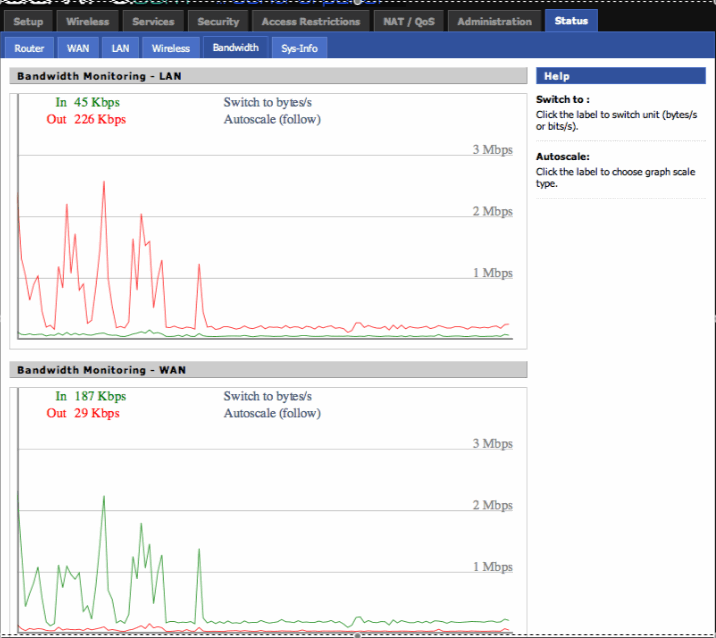
dd-wrt has everything I need and more, and I have now completely replaced by OpenBSD router. Here are my favorite dd-wrt features sorted in a top ten list:
1. Super stable (it runs a Linux kernel, which is an added bonus)!
2. Lots of performance graphs and statistics.
3. Support for wireless A/B/G/N + wired Ethernet.
4. Incredible support through the forums (I have yet to use this, but the replies I’ve seen are killer).
5. Built-in support for various wireless security protocols (WPA, WPA2, 802.1X, etc.).
6. Functional DHCP server.
7. NAT and QOS support.
8. Built in DNS caching.
9. Bridging and VLAN support.
10. ipkg, which allows you to add numerous 3rd party packages (samba, upnp servers, etc.) to the router.
This is only a subset of what dd-rt can do, and I can’t speak highly enough of the product! Mike rocks for recommending this, and I am stoked that I have such a reliable device acting as my access point / Internet router (my previous APs were rather flakey, so hopefully you can see why I am so excited about having a stable device routing packets from my wireless and wired host to the Internet).